Tuesday, October 21, 2008

Cloth Diapering Update

Cross post from our baby blog (the gnluv blog)

This post was supposed to be written back in August right after we prepped our batch of cloth diapers. The weekend I supposed to write the post was the weekend that G was born.

I wanted to attempt cloth diapers, so A left the diaper research and plans to me. The idea of landfill waste due to disposable diapers makes me cringe and as we bring G into this world it’s even more important that we attempt to leave the world a better place for the next generation.

When I first saw this shirt, I couldn’t get it out of mind. It pretty much summed up the main driver for cloth diapering.

Our plan was to give the cloth diapers a try and see if it would work for us. The plan was to:

  • Start with disposables until the meconium passed but use eco-friendly disposables. Tushies were the ones I selected.
  • Switch to Kissaluvs Size 0 (KL0) until he’s about 12 lbs and use some infant prefolds if we ran out of KL0s between washings.
  • Go to Bum Genius 3.0s from 12 lbs to potty training.

I didn’t want to use prefolds exclusively (which is what diaper services use), and the thought of the added eco-impact of a diaper service coming from San Jose didn’t sit well with me either. But we did buy prefolds to use as backups and burp clothes since they are so cheap ($1.50 - $2.50 each).

Before G was born I placed our order with with Jillian's Drawers for the KL0s and some prefolds (as backups). I prepped them so we would be ready to start using them we G came home. Here's a pic of our first stash of diaper goodies.

The plan changed when G was born. He was too small for the Tushies (the smallest size is a Size 1) or the Kissaluvs, so we stuck with the eco-awful Pampers Swaddlers they issued us in the hospital. I was worried that 4 weeks of Swaddlers disposables would spoil us and that we wouldn’t give the cloth diapers a fair chance.

We started using the Kissaluvs two weeks ago. So how’s it going?

We had more leaks the first week (about 1/day). But realized it was because if any part of the KL0 wasn’t covered by the waterproof cover (we’re using ProWraps) then once the diaper was wet it just wicked the wetness to G’s clothes. Our leaks have been minimized, but if someone can recommend a better cover I'm all ears.

We decided to continue with disposables at night because the KL0s can’t hold the pee from even a 4-5 hour sleep session and there isn’t room for a doubler. Life is all about trade offs and in this case we chose SLEEP.

We need to change his diaper more often with cloth since he really tells us when he’s wet now. It’s getting easier to tell the diaper cry from the other cries.

We’re using about 6-8 KL0s per day and 2 disposables per night. We’re washing a load of diapers every other day. For now, we’re sticking with it. Let’s hope we make it to the Bum Genius stage in a couple of months.

I'm hoping it will be easy to stick with this plan since our day care provider supports cloth diapering and our good friends A&B are also doing cloth diapers -- so we have a support group!

If you are considering cloth diapers, check out the Trial Program from Jillian’s Drawers where you can try a variety of cloth diapers for only $10!

And for more info on cloth diapering, check out the Tutorial at Jillian’s Drawers and let them debunk a few myths.

Friday, July 25, 2008

Bun in the Oven pics on Augie's Blog

As I expected Augie posted pics from our photo session on his blog this morning. Check them out -- I'll paste in one pic below (mostly because I'm lazy and a bit slammed w/ work today) - but we'll post more later when we get the full CD of pics from him. Although I'm sure he's already selected the best ones.

Thursday, July 24, 2008

Teaser from Pregnancy Pics

Today we did another photo shoot with Augie for some pregnancy photos. As always it's great to work with Augie. We met at his house in the morning and drove to an area near San Ramon that is still pretty rural - fields, horses, animals. We did some shots near a huge old tree, some in an open field with blue skies, along a fence with horses in the background, and some fun shots.

He sent us a teaser blue sky photo which has us excited to see the rest of them. I'll post a few more when we get them, although I wouldn't be surprised to see a few more appear on Augie's blog very soon.

AvaShanePrego1

Tuesday, July 22, 2008

Shameless plug - Cloth Diapers?


Shameless cross post to support Baby Cheapskate and to enter into a raffle for cloth diapers. Interested in entering?


http://babycheapskate.blogspot.com/2008/07/giveaway-12-bumgenius-30-diapers.html


And so there is some content here - have any of you tried cloth diapers? wash yourselves or use a service? basic cloth diapers or all-in-ones? Tried but stopped, why?


Give me your insights in the comments!!! At this point, we are planning on giving cloth diapering a go (after the first couple of weeks - hoping we can skip the need for newborn sized cloth diapers and go straight to the all-in-one Bum Genius diapers).

Sunday, July 20, 2008

Stair Railing Make Over

The latest home project was a remodel of the stair railings. We've been thinking of what to do with our railings since moving in two years ago. We wanted something a bit more contemporary, and we needed to make it safer for Baby G once he starts running around. The current verticals have a 7 inch gap; large enough to fit MY head through.

This is the only pic I could find of the original railing - although it is from when the house was for sale, so it's old.

We're very happy with the end result.

The project started with removing the oak wood top rail. I stripped the old stain, did two coats of new stain, and two coats of clear. This only took two weekends of work. Then I had the stainless steel cables made by a rigging shop in Southern CA - 22 cables for the sloped railing and 33 cables for the flat railings.

A coat of black paint was also needed. With a pregnant wife in the house I needed to find a zero-VOC paint - an industrial zero-VOC, self-priming paint for metal did the trick (but was expensive at $60/gallon).

The fun then started - drilling 110+ holes into the steel railing. At 4 minutes per hole plus changing bits, resting, and general cleanup you can see why this stage took three  long tiring days and about 10-12 drill bits. Cleaning up the tiny metal shavings wasn't very fun either.

After the drilling and clean up, it was time to drop in the cables, tighten them up, and put the wooden top rails back on.

See the full Flickr set for more pics.

Wednesday, June 25, 2008

RANT: Shutterfly can't Add Pictures

I haven't used Shutterfly in a long time, so I decided to use one of their Free Print offers and give Shutterfly a spin again. But it's a bit hard to use the service when you can't upload pictures!

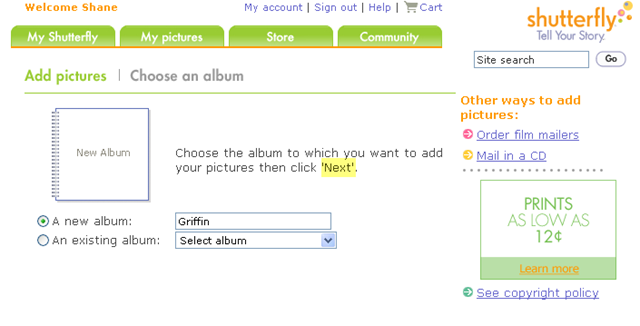
The text on the pages of their Add Pictures flow refers to buttons that don't exist! If you don't put a BROWSE button on the page or a NEXT button you can't really finish the Add Pictures flow. No Added Pictures = No User Engagement.

I tried it in Firefox 2. This is the page I received when I clicked Add Pictures (highlighting added during screen grab). I couldn't find the Browse button. Somewhat hard to load an image if you can get to the file on your PC.

ShutterflyUploadHL

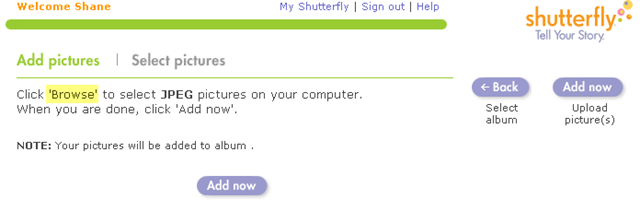
So I tried it in IE6. After a few pages of errors because it couldn't load the page. But I got past the login and clicked Add Pictures.

ShutterflyUpload2HL

Well, now. It's a different page layout. But once again, a button is missing. This time it's the NEXT button. As a guess, I hit Enter and it worked.. took me to the next page in the flow.

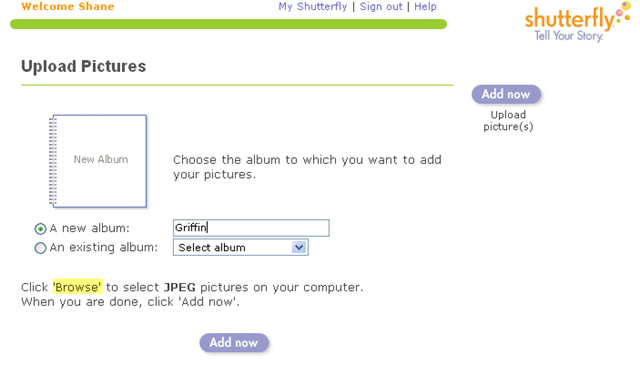
ShutterflyUpload3HL

But no dice. Once again, the page refers to the mystery BROWSE button.

So what should I do? Maybe it's time for me to completely ditch Shutterfly completely, which I've pretty much done over the last year or so. The occasion email offer and looking at friends shared albums is all the gets me to their site anyways.

And for this problem to happen the same day that Multiply releases some brand spanking new features! Omen?

Sunday, June 22, 2008

Commuting Costs Spreadsheet

In my last post on Gas Prices and Commuting I confessed that I whipped up a spreadsheet to model the commuting costs of several options. It started with a basic question of "I wonder at what gas price it will make financial sense to take the train instead of the motorcycle?"

Note that this was just financial sense! Which makes this somewhat of an academic exercise because there are other factors to consider in the question of commuting options. How about: commute times, flexibility, carbon footprint, productivity.

I attempted to include in the model:

  • fuel costs ($/gallon)
  • train/bus fares (using 10 ride CalTrain tickets)
  • parking (daily parking costs)
  • oil changes (every 3000 mi for motorcycle, 5000 mi for car)
  • tire cost (ballpark cost of tires per mile)
  • pre-tax treatment for commuting benefits

The pre-tax treatment is pretty important. Parking and mass transit costs can be paid from the pre-tax withdrawals from my paycheck - using a 34% tax rate means that $10 paid from pretax money is only equal to $6.60 of after tax money.

Here is a shot of the spreadsheet table. The final cost is a round trip total. the blue shaded items are the ones that can be paid from the pre-tax account. Here is a view only version of the sheet on Google Docs. If you want to know more just let me know via the comments.

CommuteSheet1

Note: At the time of this post, our gas price is $4.599/gallon. To answer my original question, I just kept increasing the $/gal until the total amount for the train was less than the motorcycle amount. This happened at about $6.70/gal.

CommuteSheet2

After comparing the motorcycle to taking CalTrain to SF, I added a few other commute options which aren't really options until we buy a second car (which we'll do soon before Baby G arrives).

What can you do with a similar sheet? Compare your commuting options, compare the costs of a commute with two different vehicles you are considering buying, calculate your total commute costs over a period of time.

Embrace the spreadsheet! It's your friend!

Changes for the blog

I've made a few changes and updates to the aerialsoul blog. Minor items but things I've been wanting to do for a while.

1. I've burned the RSS feed with FeedBurner which allows me some basic stats for tracking those of you that are reading the blog using a blog reader. Is there anyone actually reading this? Huh? If so, drop me a comment.

2. Added an option to receive the new blog posts via email -- see the bottom right side of the main blog page to sign up for email delivery! Now those that don't use RSS or Blog readers can still stay updated with very little effort.

3. Added the Disqus commenting tool to the blog. This replaces the default commenting provided by Blogger. One of the nice features it that is allows threaded discussions (which Multiply has done for a long time). You will only see this new comment feature on the new posts -- this will be the first one.

4. Added a few new widgets to the right sidebar on the main blog pages. Added a Blog list that shows the recent posts from 4 of my fav blogs and a slide show of my recent Flickr pics.

Tuesday, June 17, 2008

Gas Prices and Commuting

I've been watching the gas prices go up week after week and lately it's day after day. Ava is sick of hearing me gasp at the gas prices each time we pass the corner gas station. It's really just become a morbid fascination.

This pic pretty much sums up my thoughts.

GasHumor Photo from T-Shirt Humor

I'm shocked at how fast the prices are rising, but I'm also optimistic that we will finally see some lasting changes in behavior. Short term spikes in prices don't really change the way people behave or what decisions they make. They aren't likely to run out and sell the SUV and buy a hybrid just because fuel goes up a bit. I'm happy to hear that we are actually seeing some movements in the cars people are purchasing -- and not just in California.

So what have I been doing?

For the last few months, I've been using MyMileMarker to log our fuel purchases. I use the mobile version of the service to log each fill up on the motorcycle and the Civic. I've also lately used their Twitter interface which is super easy to send a Twitter msg from my phone giving the vehicle name, odometer reading, gallons, price/gallon. It helps to monitor the mileage on a regular basis. ServiceBeacon also added a feature to track fuel purchases.

I also wanted to know at which price point was it cheaper for me to take CalTrain on a regular basis instead of riding the motorcycle to work. So of course, I whipped up a spreadsheet (those that know me well, know that Excel is a very good friend of mine).

I know from an eco standpoint, I should be riding the train more often. But the eco decisions are tempered with the reality that I only have 24 hours in a day and the train adds 20-30 minutes each way to my commute.

I'll make another post soon with the details of my spreadsheet work, but I found out that when gas reaches $7.50/gallon, it's cheaper to take the train to work instead of the motorcycle. The bike gets 48 mpg and parking is $2.50/day -- and it saves me an hour a day.

BUT I may start riding the train more often once G arrives. I haven't found a car seat for the motorcycle, so a car will be needed when I start incorporating day care drop offs and pick ups to the daily ritual.

Monday, June 16, 2008

My Network Board profiled on Lifehacker

lh_logo The network board I built a while back to unclutter my desk was profiled last week on Lifehacker. Here is the LH post - Three Reader Gadget Pegboard Mounts.

This is pretty much a full circle blog project - I got the idea from a LH post, came up with a solution that worked for my situation, posted it to my blog, recently posted pics to a LH Flickr group, the solution is posted back to LH, and now I'm posting about the LH post. Great!

I've been thinking about trying to make this project into a product - it's a simple idea/solution, but it still takes time to execute it. But who doesn't want to declutter their desk? Would you consider purchasing this 'type of product' to organize the devices on your desk?

Wednesday, June 11, 2008

Test Post using Win Live Writer

I've been a bit frustrated by the Blogger tool for post creation and came across a post on Lifehacker about Windows Live Writer. I decided to install it and give it a whirl. So this is just a quick post to see how well it can actually push a post to my blog.

If I can find a tool where I don't dread the details of posting more than actually writing, maybe I'll post a bit more often.

Now for a pic - here is a pic of a friend's newborn girl that I took this weekend -- beautiful Reese looks so peaceful.

Sunday, June 8, 2008

New Biz Cards

For the first time in six years I've gotten a new batch of business cards (for work, not personal cards). My previous roles have been very internally focused so I didn't even worry about business cards, but with the new role I do need them.

As I looked at yet another card, it made me walk backwards through the list of jobs I've had and wish that I had a copy (or an image) of each of my cards. I know I have a few of them tucked away in files or old laptop bags. If I find them I'll update this post with a Business Card walk down memory lane. For now, it's just an image of where I stand today professionally.

Rant: Pay for Bad Service - Airline Baggage Fees

If you've traveled recently you probably know about the airline baggage policy changes. The increased fees for baggage have been changing for quite a while, but for me it's getting pretty ridiculous. These fees look to be last ditch efforts for an industry in a steady state of decline.

NOTE: Pay attention to baggage policies BEFORE you buy your tickets. The extra fees you pay for baggage may make it worth buying a more expensive ticket that allows for more baggage. And at least know your baggage weights before you leave home -- in some cases it's cheaper to pay extra baggage fees online instead of at the airport. And be careful packing those large suitcases, it doesn't take much to get to 50lbs (typical weight limit for luggage on economy tickets).


Expedia recently sent me a nice link to updated baggage policies for an upcoming trip (see the image or Expedia's link).

What strikes me as 0dd is American Airlines' baggage policy. Currently they are the ONLY airline charging for your FIRST checked bag! And they have the WORST rate of mishandled bags - 6.85 Mishandled baggage per 1000 passengers. The other large airlines aren't great either, but AA is the worst of this list. (sorry for the poor images, still figuring out SnagIt).


Isn't this some type of leap of faith?
"We suck so pay us more and then we can make it better."
I can see the unintended impact of this policy. Anyone else see a plane load of people trying to cram over sized carry on bags into the overhead?

Saturday, May 31, 2008

Obama Car spotted


In SF it's never odd to see tricked out or 'art cars' cruising down the highway, but this car caught my eye. We were driving on 280 South near Palo Alto on Friday night when this car cruised past us. It's covered in Obama bumper stickers -- COVERED!!!

I hit the gas while Ava pulled out her phone to snap a shot. As we slid up beside them and snapped a pic, I felt obliged to give them a thumbs up!! Our friend Jake would be proud!

Sunday, May 25, 2008

Travel Tips


After our recent trip to Italy and Bulgaria, I thought I would pass along some travel tips that may seem obvious to some and could save you frustration later.

1. Let your bank and credit cards know you are traveling
The banks are trying harder to fight fraud so they will quickly put a security block on your ATM and credit cards. Take the 5 minutes to call the number on the back of your cards (including your ATM card) and let them know your travel dates and destinations. There were 5-6 of us on our Italy trip that had problems with our ATM cards.

2. Consider using a GPS
The Europe maps for our GPS unit were worth every penny of the $150 we spent. Just be sure how to enter the addresses for your destination. They saved us several times when driving through Italy.

3. Get the phone numbers for your credit cards and bank
Get the international calling details for your credit cards and bank BEFORE you leave. We had problems using the toll free numbers from outside of the USA - and of course, when the bank called to alert us to the security block placed on our cards they left the toll free number to call them back.

4. Find out the details of Roaming coverage and Costs for your mobile phone
Find out the roaming costs before you leave and determine if it makes sense to sign up for an International Calling Plan before you leave. Even if you don't plan on using your mobile phone it's good to have the info just in case. And be careful about data charges!!! Just because you can get a data connection doesn't mean it's covered under you plan -- and roaming data plans typically charge per MB which can add up quickly!

5. Understand how to call FROM your destination
This part really made me feel like an idiot. But figure out how to call from your mobile in roaming mode either within your destination country and back to the US. Also how to call from a landline phone.

6. Set up email filters and rules to hide the non-urgent emails
If you are traveling for vacation you probably still want to read email but try to hide the crap from your inbox, especially if you will be using internet cafes or pay for bandwidth connections. I just setup a label (SAVE) and quickly labeled the msgs from my Inbox as I checked email -- I would have rather had them automatically labeled based on rules defined before I left.

7. Get currency before you leave or right when you land
I'm on the fence on this one and will have to do some more research, but I'm starting to like having a small amount of local currency as soon as I arrive. I'm suspicious of the fees charged when exchanging money at the airports, so I'm going to consider getting currency from the foreign exchange desk of my local bank. My bank also charged a Currency Exchange Fee when I used the ATM card for purchases, so watch out for these fees too.

Wednesday, May 21, 2008

What's in a Head Nod?

Have you ever realized how much is communicated by a head nod? Especially when you can't use verbal communication? Over the last week, I've been even more aware of how much I depend on body language and head movements for communication. In Bulgaria, you can't depend on the head nod of up/down for Yes and side/side for No because it's reversed in BG. They use the up/down for No and side/side for Yes. Does any other culture do this?

There are many communication studies about how much is communicated via non-verbal cues -- something like 80% is communicated via non-verbal actions (I'm too lazy to link to a specific study). So even though I know the Bulgarian words for Yes and No (da = yes, ne = no), I still find myself paying more attention to the body language than the words. It's even worse if I'm not close enough to hear the words.

We were walking across the parking lot of the metro station on Monday near the BG capital of Sophia and tried to wave down a taxi. As the driver saw the hand wave (seems the taxi hand motion is understood across cultures), he moved his head left to right. I slowed down and started looking for another taxi. When I turned back, Ava was walking faster to the cab as I saw him still shaking his head but also waving us to the taxi.

The head nod can get even more confusing when some Bulgarians switch it up because they know you aren't a local, so you really need to pay attention to the words!!

Sofia Take Two

Background - My first trip to Sofia, Bulgaria was two years ago in August 2006. Sofia is where Ava was born and lived until 1991 when she moved to California. She's been back to Sofia four times before this trip to see family and friends.

It's been two years since Ava and I were last in Sofia, Bulgaria. So what were my initial impressions of Sofia on this second trip?

It's been a little over a year since BG was accepted into the EU, so I expected to see visiable changes.

First - the Sofia airport is now sporting a new terminal that looks very nice and presents a great first impression upon arrival. Clean, shiny surfaces. Good signage (including English). And all in all pretty efficient to clear through Passport checks, baggage claims, and customs review. No forms to fill out, just show passport, get your bags and get out. No need for us to deal with a rental car since Ava's aunt picked us up, but I'm not brave enough to drive in the capital anyways.

Second - on the drive from the airport, the number of newer cars on the road was surprising. It seems one of the results of an improving economy is that people replace the old cars. Many are used cars that have come from the US (and other countries), but most of the cars look to be less than 10 years old. There are a fair number of new and expensive cars (Porsche, BMW, Audi...even saw a Bentley one night). The driving habits seem to be improved as well -- I guess if you drive a new car you aren't as willing to risk a fender bender. Two years ago, it was down right scary sitting in the back seat of a car driving in Sofia. Now it's still a bit freaky at times, but not scary (at least not scary ALL of the time). It's almost to the point that I may consider renting a car next trip for our drives outside of the capital.

Third - as the price of gas passed $4/gallon at home before we left, I had been tracking gas increases for months. Well, $4/gallon is chump change compared to fuel prices in Europe. In Sofia, the price is about 2.50 leva/liter for diesel -- which works out to $7.72/gallon!!!! It was even more expensive in Italy -- diesel ended up about $8.61/gallon. So while the economy has improved, cars are newer which is great for improved emissions, but the overall number of cars has increased. So traffic is pretty bad now in and around Sofia at rush hour.

Forth - the basic infrastructure in and around Sofia is in need of major investments. The roads and sidewalks probably haven't had any work in the last two years. The roads are full of pot holes, some are big enough to be called sink holes. The locals know where they are and swerve all over the road to avoid them -- sometimes at 40 mph. So to the outsider, it looks like cars are just swerving around randomly, but it's an orchorstated manuveur that is anticipated by other drivers. The government really needs to pick up the pace of improvements in this area.

Fifth -- (the numbers will stop now) The number of new construction projects taking place within sight of older run down buildings is even more pronounced. It's just odd to see solid structurally sound buildings in need of TLC sitting next to the new 10-15 story hotel or business office building. It must be due to the ownership and legal structures of the old buildings that make it easier for developers to acquire land and start a new building. I don't have any real info on this situation but I just can't stop wondering why it's the case. It presents an odd juxtoposition of shiny new building along side what appears to be a run down structure.

These are just the top items that hit me at the beginning of this trip to BG. Nothing too deep or emotional. Sometimees it's strange what stays at the top of my mind on trips.

Saturday, May 17, 2008

IkeaHacker Headboards


Our custom Malm Headboard hack was mentioned on IkeaHacker this week!!! Yeah!!

Here is the link -- LINK to IkeaHacker Post. We were mentioned along with a few other headboards.

Sunday, May 4, 2008

Amazing Engagement Shots

I just couldn't resist posting about these engagement shots. Our good friend Augie Chang (who shot our engagement photos, wedding, and some casual photos) frequently posts to his blog about his activities and puts teaser shots of his photo sessions. Today he posted some of the most amazing engagement photos I've seen -- if I didn't know better I'd swear they were a work of photoshop magic. I'm just going to put a single image from Augie's site here (hope he approves) as my teaser, but know it's worth clicking the link below.

Augie - Linda and Calvin E-Session Soaked

Saturday, April 26, 2008

If you can't find it, Build It.

Ava and I typically spend a fair amount of time finding items for the house. We start with an idea of what we are looking for, usually a specific design with function! If it doesn't function, it's not worth it.

For more than 12 years, I've had a lift top coffee table that is VERY functional. We use it for dinner in front of the TV and laptop use on the sofa. The old table was given a new life 4 years ago when I refinished it with a mahogany stain.

After a new sofa, new entertainment unit, and art for our living room, we were having a hard time finding a modern table that still had a lift top with a storage area. I found a Room & Board stainless steel base that worked, so it was time to build what we wanted. It took a lot longer than I expected, but we're happy with the results.

New TableNew Table with Top Up


I used birch plywood with birch veneer edging to cover up the visible plywood layers. The corners are glued and dowel joined. I had to rig up some brackets to hang the wood box from the base frame. The lift-top mechanism was harvested from our old table, but the springs were too strong for the new top. I was able to remove the old springs and install a weaker spring (who would have thought Home Depot sold springs).


I also made a table top for a matching console table frame, which will sit behind our sofa for a living room desk area.

Here is the Flickr set.

Thursday, April 3, 2008

Just too funny

I'm not super big on recycling posts from other people without anything to add, but I've laughed at this several times this week. I saw it on Marc Andreessen's blog. It's completely safe for work viewing.

Saturday, March 8, 2008

ABC wants to force commercials on you


I read a post by Marc Andreessen last week about ABC's plan to develop their own on demand video service, and I still can't stop shaking my head at their plans. I'll pull in the lines from the post written by television industry journalist, Bill Carter, that pretty much sums up ABC's views:

Looking to strike a blow against the proliferation of digital video recorders, the ABC network, its affiliated broadcast stations, and Cox Communications’ cable systems are establishing an on-demand video service that would allow viewers to watch ABC shows like “Lost” and “Desperate Housewives” any time they choose.

The catch: It uses a new technology that disables the viewers’ ability to fast-forward through commercials...

Several executives involved in the project, which ABC plans to offer to other cable systems around the country, said the move was an overt attempt to staunch the use of DVRs like TiVo, which viewers often use to avoid commercials. That activity is increasingly seen as threat to broadcast television, which depends on ad revenue to pay for programs.

“This does counter the DVR,” said Anne Sweeney, the president of the Disney-ABC television group. “You don’t need TiVo if you have fast-forward-disabled video on demand..."

Ray Cole, president of Citadel Communications, which owns three local ABC stations, who is also the chairman of the board of affiliated ABC stations, was even more direct about the goal of the new service.

“As network and affiliates, we both have an interest in slowing down the explosive growth of DVRs,” Mr. Cole said. “This is about combating DVRs. As we developed this at every stage, there was an agreement that however we put this together, disabling the fast-forward function was key.”

Now my rant - how can ABC attempt to develop a product that goes against what consumers want. Do they think we will just throw out our DVR and welcome their box into our homes? Have they not learned from the music industry and the approach old media has taken to digital music? Prior to this post, I actually thought that ABC may be getting "it" with their online approach to TV. I really like their online offering at ABC.Go.com. Full episodes of shows with very limited commercials. I think their approach gives a nice balance of limited commercials with a viewer friendly interface that allows full episode viewing (some even in HD quality) of recent shows.

If ABC plans to use their online type of mandatory commercials for their set top box, then they need to pitch it VERY differently! Don't tell the world your goal is to MAKE your viewers watch your commercials. Pitch it as a balance of customer wanted On Demand shows with very limited commercials and then quote some findings from the ABC online 'experiments' about customer satisfaction.

And later that week I read a post from Silicon Alley Insider about NBC's study of DVR usage which gave a view of how NBC seems to be taking an "if you can't beat them join them" approach to DVRs. NBC has found that some skipped ads still have value. It looks like NBC may be the ones to learn how to work with consumer behavior instead of fighting it.

If ABC doesn't want to run their own research they can just buy it from TiVo. During the TiVo quarterly analyst call last week, CEO Tom Rogers (no relation) noted that,
We are the only player out there providing (advertisers) with new forms of inventory as well as research on how people are avoiding commercials.
ABC should buy this research, learn what consumers are doing, and then figure out how to work WITH the behavior not try to beat their viewers into going back to old behaviors.

It's been years since TiVo first released their commercial skipping box, and I keep waiting a commercial intended to be skipped! I envision a commercial that when fast forwarded takes on a completely different visual -- that commercial will not only be skipped it will be replayed over and over! And posted on the web in fast forward. I haven't seen one yet -- but then I skip commercials.

Hey, Old Media!!! Start innovating!


Disclosures: I've been a TiVo user since early 2001. I have one TiVo Series 2 hooked up with a Lifetime subscription in the master bedroom, one TiVo Series 1 in the closet, one TiVo Series 2 in the guest room without a subscription, 1 Comcast HD DVR in the living room, and we've given 3 TiVo boxes as gifts.

Monday, March 3, 2008

RSS Blogs delivered via email

Over the past several months Ava and I have been posting to our blogs on a frequent but somewhat random basis. Several friends and family have mentioned that they try to go to our sites to look for new posts. This is where RSS (Really Simple Syndication) feeds make things easier!

Ava just recently started using Bloglines for blog reading and has completely embraced it. I've been using G Reader for about a year and it's always open in my browser. If you use Yahoo! Mail, you can get RSS feeds within Yahoo! Mail - here is a Tutorial. But we also know that many people haven't warmed up to using RSS or Blog Readers.

If you aren't ready to use a Blog Reader, there is good news. Here are two services that deliver RSS feeds to your email. Just enter the feed url for our blogs and your email address and when new posts are made to our blogs, you will receive an email.

SendMeRss
RSSFwd

Friday, February 22, 2008

Clouds from the plane


For as long as I can remember I've loved the view of clouds from a plane. This is a shot of the view from the plane on Wednesday's flight from DFW to SFO.

With each blink of an eye, the vision I see changes. The clouds look like:
  • they are only 50 feet below the plane
  • fluffy pillows -- a white version of a huge bed filled with pillows
  • the flowing sands on a large, large beach
  • the plane is hovering -- it seems as if we aren't really moving

It makes me just stare out of the window and brings a smile to my face (and my soul).

Wednesday, February 20, 2008

Team Future is in town: tunnel flying kids

I posted a week or so ago about the Pint-sized skydivers - Team Future. They are in town and will be flying at iFlySFBay on Thursday after 4pm and this weekend. I'm trying to get more info on the times.

RANT: Give me an outlet for my phone

Why o Why don't hotels give you an easily accessible electrical outlet next to the bed for your mobile phone? I (and others) use the mobile phone for an alarm clock -- after years of traveling I know you can't trust the hotel wake up calls and figuring out a new alarm clock in each hotel is just a pain.

I'm sick of moving nightstands, digging behind beds, and generally not finding an open outlet. Any Hotel Room designers out there? If so, LISTEN up -- put an outlet on or near the nightstand! A simple extension cord will work!

Wednesday, February 13, 2008

Backups of home laptops and Network Storage

For the last couple of years we've used a pretty basic backup process for our personal laptops at home. We have a 160 GB Buffalo Linkstation and a 160 GB USB external drive for a mirror. It's not a ton of space but it's been enough for us.

We have Handy Backup running on our laptops set up to run backups each night between 2 am and 6 am. Handy Backup used to backup data and critical files from our laptops and our hosted websites. Handy Backup keeps a copy of our website files by syncing each night via FTP and also backs up data files to the NAS drive. Most backup sets keep 3-7 days of backups and are compressed using zip files. The NAS drive is mirrored to the USB Drive each night as well. This protects from a disk crash of the NAS drive. Using this process our only critical point of failure is a complete disaster where we lose all of our laptops and the drives. I plan to close this gap soon.

A few weeks ago, the NAS drive was almost full. The increased file size from Ava's camera and the Good Eat's archive we've been building from TiVO recordings started eating up space on the drive. We'd finally outgrown our 160GB drive.

It was time to get more disk space at home. So the search for a new NAS box started. I wanted to get something that had at least 500GB of storage and had protection from a disk crash. This could be a RAID box or just a straight mirror (another drive of the same size for a copy). My search led me to Windows Home Server -- yep a MS product. I wanted to discount it right away feeling that going down the route of a WHS box would be sealing our fate to always be a Windows Household. Confession Time: I still keep thinking I'll purchase a Mac and join the cool crowd. The first OEM WHS box was the HP MediaServer and there still aren't many OEM WHS boxes out yet. I spent time reading various forums (WeGotServed was a good one) and it seems that many folks are pretty jazzed about the WHS features. The number of Add-Ins for WHS continues to grow as well. The real feature that kept pulling me back to the WHS solution was the ability to add disk space as you need it -- the HP MediaServer doesn't even require a screwdriver to add space. Open the front panel, slide out the drive tray, drop in a disk, and a few clicks on the Control Panel --- Bam, more space. WHS also deals with the duplication of data across discs to reduce the risk of a single disc crash. The complete backups of Windows machines also satisfies a big requirement.

The WHS solution gives us the ability to add space later (as space gets cheaper), automates backups of our Windows laptops (we have 3 personal laptops in the house). centralizes our media (photos, videos, music), and serves up the media. I'm also interested in many of the Add-Ins that are being released.

The order has been placed (using Ava's 10% HP discount). FedEx says it will arrive on Friday. I'll post more as I get it set up. If you have a Windows Home Server and have any tips, certainly let me know about them!

Around this time I also spent a fair amount of time researching online backup solutions. After researching some of the major services - Mozy, Carbonite, and Jungle Disk (which uses Amazon S3 storage). I decided that Jungle Disk was the one to dive into further (I'll probably write more about this decision in a future post). But after the WHS decision, Jungle Disk has a bonus for me - Jungle Disk offers a solution that ties into WHS.

Friday, February 8, 2008

Test Post for Multiply Cross Posting

Sorry about random posts but I'm still testing cross posting from Blogger to Multiply. And without setting up 'test' accts on both Blogger and Multiply I'm left with testing on the real accounts. I'll delete these posts later. Let's hope this works.

Now in the meantime -- I'll be waiting to see if the Y! board makes a decision today -- and if they do will we find out more details from the blogoshere or from a real communication.

And how about a pretty picture since I've wasted your time thus far? I love this shot from a few years ago. It's the beginning of a great hybrid dive (some flyers on their belly and some flying vertical - either headdown or sitting). Ava (wife) is one of the belly flyers. The guy in Yellow standing on their backs is Eli Thompson - host of Discovery Channel's Stunt Junkies.


Sunday, February 3, 2008

Custom Malm Headboard - Ikea Hacking

We liked the Malm bed frame but wanted to use a mattress and base/boxspring which ended up covering up most of the headboard. We also wanted a taller, padded headboard, so we hacked our own. This didn't end up saving us money compared to purchasing a new bed frame and headboard, but it was a great project for some serious Ikea Hacking (check out Ikea Hacker for more Ikea Hacking). And in the end, we have a headboard and bed that we love.

The desires for our bed were:
  • tall padded area to sit up in bed to read or work on the laptops
  • night stands at mattress level for alarm clock, drinks, lamps, and other stuff
  • limited clutter from cables and cords
  • lighting that could be controlled from either side of the bed
  • lighting that wasn't too hot (no halogen lights) and was energy efficient if we fell asleep with the lights on
Our bedframe was a King frame, so we hacked two Malm nightstands, Malm king frame, another Malm headboard, and a Pax wardrobe cabinet. The lights are also Ikea with compact-fluorescent bulbs. We opted to pull the bed off the wall to give it more dimension and to make it easier to access the power plugs behind the bed. And honestly, it made it easier to screw it all together.

Check out the Flickr set for more pics along with captions and Flickr Notes on the details - 2007 Ikeahack Malm Headboard

First hack - Nightstands
In order to make the nightstands taller. I switched the location of the drawer along with the little shelf - mount the drawer in the top holes and the shelf in the bottom holes. I only needed to drill two new holes to make the drawer unit install higher. I then cut off the little shelf so that it would install under the drawer - the little shelf is used to keep laptop power adapters off the floor. I also drilled a hole in the back for a cable grommet to route plugs/wires through the night stand. Since the drawer units were taller, I used the scrap from cutting the small shelf as a support to give the nightstand more stability.

The headboard - working with the Malm material

Before putting it together, I mounted the lights and did the wiring for the control switches. The lights are wired to a dual switch mounted in the middle of the headboard, so each of us can control both lights.

The next challenge was stacking a second headboard onto the existing one and making sure it was secure (we are in earthquake country).

This is where you need to work with the solid parts of the Malm material. There is about a 1" wide solid wood border on the headboard with about a 4-6" solid section in the middle of the headboard running vertically. I was able to use a stud finder in order to mark the edges of the solid material. I also drilled small holes to confirm the critical areas were solid.

I used a strip of 1" x 2" wood screwed to the back edge of each headboard with drywall screws. This secured the headboard and aligned it.

The top shelf was cut from the side wall of a Pax wardrobe unit. The finish matches, and it provided finished edges along with the strength to support the headboard. I once again used a 1" x 2" wood strip (cleat) screwed to the studs of the wall to support the top shelf. The top shelf was screwed from the top into the wall cleat and into the top of the headboard. There is also a hole with cable covers in the top shelf to allow for the routing of lamp cords.

In order to secure the padded squares, I screwed in a 1" x 2" wood strip on the back at the level where the padded squares would be mounted. This basically creates an exoskeleton that allows the strip to form the structure for the padded squares. In hindsight, this was overkill. I should have used super-strong Velcro strips to mount them.

The tops of the nightstands were also cut from the Pax material. I mounted the night stand tops with Pax hinges to create a hidden storage area. A hidden shelf was installed inside the top of the nightstands that could hold a power strip and other items. This helps keep a clutter free area. Once again this part took a ton of time to get right, and I'm not sure if it was worth it. It does make it easier to reach the plugs, power strip and cabling, but the hinges were a pain to install.

The last step is to decide if we want to cover the sides of the headboard to hide the structure that exists behind the headboard. For now, it doesn't bother us.

Unclutter my desk - Network Board


This was a weekend project I took on a couple months ago with the goal of cleaning up the surface of our desk. I had seen a few different versions of this project on Lifehacker which led me to Decluttered . I ended up building mine with materials I had in the garage.


The goals for this project were:
  • keep the network devices off the desk
  • minimize the cable clutter (this was a side benefit)
  • keep the devices cool or at least prevent overheating (this meant no enclosures)
  • allow the WiFi router to maintain good coverage -- keep the antennas clear
  • allow for easy access to reboot the router (it's needed every 3-4 weeks)
So a section of peg board that I had in the garage, some paint to match the wall, two small L-brackets to secure the board to the underside of the desk, and a handful of zip ties to secure the devices to the board led to the finished product.

I also added an L-bracket to support the network drive since it weighs a bit more than the other devices.

A little time mapping out the location for each device -- allowing enough space for airflow and for the cabling to be tied to the board. I zipped tied everything in place before I mounted the board in place. Then mounted the brackets to the underside of the desk. Plugged in the power strip. The network was back up, and the desk was clean. At least until the mail and paperwork took over the free space.

Now if I could just find a hack that keeps the desk clear of paperwork I'd be happy.

See more pictures and notes at the Flickr set - 2007 Network Board

Intro Post -- Launch of aerialsoul blog


After a few false starts of setting up a blog on Aerialsoul many years ago, I'm now ready to launch blog.aerialsoul.com. This is just one part of my 2008 goal of keeping in touch with family and friends. I'm not sure how often I'll post. Maybe once a week -- maybe more, maybe less. The topics will range from details on personal projects, updates on our life, rants about random experiences, and raves about products and services.

The first few posts will be about a few events and projects from the past 6 months. So these posts may come a little quicker.

How can you track the posts? You have a few options (and I may even write up more details in a later post if you want them):
  • Just check back on a regular basis -- there may be something waiting for you.
  • Sign up for Multiply and add me as a contact (aerialsoul) - I plan on cross posting to my Multiply account and the Multiply email notifications work well.
  • Use an RSS reader and subscribe to this blog (Yahoo Mail has a RSS reader built in, Google offers Google Reader, and there are others) and also subscribe to my Flickr feed too.
  • Use a service that will email you the RSS feed (there are a few but I haven't used any)

So stay tuned and hope I can keep my 2008 goals!!