Showing posts with label Projects. Show all posts

Sunday, June 22, 2008

Commuting Costs Spreadsheet

In my last post on Gas Prices and Commuting I confessed that I whipped up a spreadsheet to model the commuting costs of several options. It started with a basic question of "I wonder at what gas price it will make financial sense to take the train instead of the motorcycle?"

Note that this was just financial sense! Which makes this somewhat of an academic exercise because there are other factors to consider in the question of commuting options. How about: commute times, flexibility, carbon footprint, productivity.

I attempted to include in the model:

  • fuel costs ($/gallon)
  • train/bus fares (using 10 ride CalTrain tickets)
  • parking (daily parking costs)
  • oil changes (every 3000 mi for motorcycle, 5000 mi for car)
  • tire cost (ballpark cost of tires per mile)
  • pre-tax treatment for commuting benefits

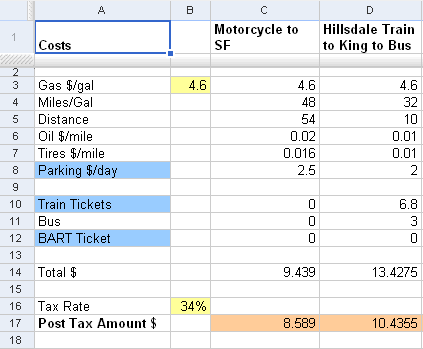
The pre-tax treatment is pretty important. Parking and mass transit costs can be paid from the pre-tax withdrawals from my paycheck - using a 34% tax rate means that $10 paid from pretax money is only equal to $6.60 of after tax money.

Here is a shot of the spreadsheet table. The final cost is a round trip total. the blue shaded items are the ones that can be paid from the pre-tax account. Here is a view only version of the sheet on Google Docs. If you want to know more just let me know via the comments.
CommuteSheet1

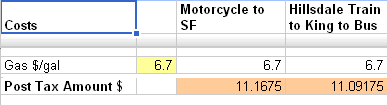
Note: At the time of this post, our gas price is $4.599/gallon. To answer my original question, I just kept increasing the $/gal until the total amount for the train was less than the motorcycle amount. This happened at about $6.70/gal.
CommuteSheet2

After comparing the motorcycle to taking CalTrain to SF, I added a few other commute options which aren't really options until we buy a second car (which we'll do soon before Baby G arrives).

What can you do with a similar sheet? Compare your commuting options, compare the costs of a commute with two different vehicles you are considering buying, calculate your total commute costs over a period of time.

Embrace the spreadsheet! It's your friend!

Monday, June 16, 2008

My Network Board profiled on Lifehacker

lh_logo The network board I built a while back to unclutter my desk was profiled last week on Lifehacker. Here is the LH post - Three Reader Gadget Pegboard Mounts.

This is pretty much a full circle blog project - I got the idea from a LH post, came up with a solution that worked for my situation, posted it to my blog, recently posted pics to a LH Flickr group, the solution is posted back to LH, and now I'm posting about the LH post. Great!

I've been thinking about trying to make this project into a product - it's a simple idea/solution, but it still takes time to execute it. But who doesn't want to declutter their desk? Would you consider purchasing this 'type of product' to organize the devices on your desk?

Saturday, April 26, 2008

If you can't find it, Build It.

Ava and I typically spend a fair amount of time finding items for the house. We start with an idea of what we are looking for, usually a specific design with function! If it doesn't function, it's not worth it.

For more than 12 years, I've had a lift top coffee table that is VERY functional. We use it for dinner in front of the TV and laptop use on the sofa. The old table was given a new life 4 years ago when I refinished it with a mahogany stain.

After a new sofa, new entertainment unit, and art for our living room, we were having a hard time finding a modern table that still had a lift top with a storage area. I found a Room & Board stainless steel base that worked, so it was time to build what we wanted. It took a lot longer than I expected, but we're happy with the results.

New TableNew Table with Top Up


I used birch plywood with birch veneer edging to cover up the visible plywood layers. The corners are glued and dowel joined. I had to rig up some brackets to hang the wood box from the base frame. The lift-top mechanism was harvested from our old table, but the springs were too strong for the new top. I was able to remove the old springs and install a weaker spring (who would have thought Home Depot sold springs).


I also made a table top for a matching console table frame, which will sit behind our sofa for a living room desk area.

Here is the Flickr set.

Wednesday, February 13, 2008

Backups of home laptops and Network Storage

For the last couple of years we've used a pretty basic backup process for our personal laptops at home. We have a 160 GB Buffalo Linkstation and a 160 GB USB external drive for a mirror. It's not a ton of space but it's been enough for us.

We have Handy Backup running on our laptops set up to run backups each night between 2 am and 6 am. Handy Backup used to backup data and critical files from our laptops and our hosted websites. Handy Backup keeps a copy of our website files by syncing each night via FTP and also backs up data files to the NAS drive. Most backup sets keep 3-7 days of backups and are compressed using zip files. The NAS drive is mirrored to the USB Drive each night as well. This protects from a disk crash of the NAS drive. Using this process our only critical point of failure is a complete disaster where we lose all of our laptops and the drives. I plan to close this gap soon.

A few weeks ago, the NAS drive was almost full. The increased file size from Ava's camera and the Good Eat's archive we've been building from TiVO recordings started eating up space on the drive. We'd finally outgrown our 160GB drive.

It was time to get more disk space at home. So the search for a new NAS box started. I wanted to get something that had at least 500GB of storage and had protection from a disk crash. This could be a RAID box or just a straight mirror (another drive of the same size for a copy). My search led me to Windows Home Server -- yep a MS product. I wanted to discount it right away feeling that going down the route of a WHS box would be sealing our fate to always be a Windows Household. Confession Time: I still keep thinking I'll purchase a Mac and join the cool crowd. The first OEM WHS box was the HP MediaServer and there still aren't many OEM WHS boxes out yet. I spent time reading various forums (WeGotServed was a good one) and it seems that many folks are pretty jazzed about the WHS features. The number of Add-Ins for WHS continues to grow as well. The real feature that kept pulling me back to the WHS solution was the ability to add disk space as you need it -- the HP MediaServer doesn't even require a screwdriver to add space. Open the front panel, slide out the drive tray, drop in a disk, and a few clicks on the Control Panel --- Bam, more space. WHS also deals with the duplication of data across discs to reduce the risk of a single disc crash. The complete backups of Windows machines also satisfies a big requirement.

The WHS solution gives us the ability to add space later (as space gets cheaper), automates backups of our Windows laptops (we have 3 personal laptops in the house). centralizes our media (photos, videos, music), and serves up the media. I'm also interested in many of the Add-Ins that are being released.

The order has been placed (using Ava's 10% HP discount). FedEx says it will arrive on Friday. I'll post more as I get it set up. If you have a Windows Home Server and have any tips, certainly let me know about them!

Around this time I also spent a fair amount of time researching online backup solutions. After researching some of the major services - Mozy, Carbonite, and Jungle Disk (which uses Amazon S3 storage). I decided that Jungle Disk was the one to dive into further (I'll probably write more about this decision in a future post). But after the WHS decision, Jungle Disk has a bonus for me - Jungle Disk offers a solution that ties into WHS.