


I haven't used Shutterfly in a long time, so I decided to use one of their Free Print offers and give Shutterfly a spin again. But it's a bit hard to use the service when you can't upload pictures!
The text on the pages of their Add Pictures flow refers to buttons that don't exist! If you don't put a BROWSE button on the page or a NEXT button you can't really finish the Add Pictures flow. No Added Pictures = No User Engagement.
I tried it in Firefox 2. This is the page I received when I clicked Add Pictures (highlighting added during screen grab). I couldn't find the Browse button. Somewhat hard to load an image if you can get to the file on your PC.
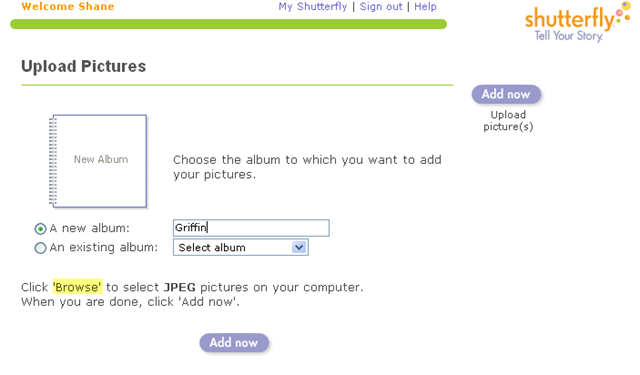
So I tried it in IE6. After a few pages of errors because it couldn't load the page. But I got past the login and clicked Add Pictures.
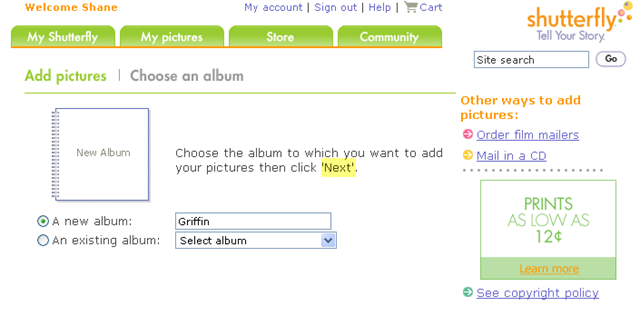
Well, now. It's a different page layout. But once again, a button is missing. This time it's the NEXT button. As a guess, I hit Enter and it worked.. took me to the next page in the flow.
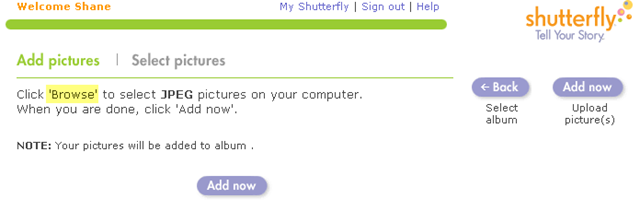
But no dice. Once again, the page refers to the mystery BROWSE button.
So what should I do? Maybe it's time for me to completely ditch Shutterfly completely, which I've pretty much done over the last year or so. The occasion email offer and looking at friends shared albums is all the gets me to their site anyways.
And for this problem to happen the same day that Multiply releases some brand spanking new features! Omen?


0 comments:
Post a Comment