Sunday, June 22, 2008

Commuting Costs Spreadsheet

In my last post on Gas Prices and Commuting I confessed that I whipped up a spreadsheet to model the commuting costs of several options. It started with a basic question of "I wonder at what gas price it will make financial sense to take the train instead of the motorcycle?"

Note that this was just financial sense! Which makes this somewhat of an academic exercise because there are other factors to consider in the question of commuting options. How about: commute times, flexibility, carbon footprint, productivity.

I attempted to include in the model:

  • fuel costs ($/gallon)
  • train/bus fares (using 10 ride CalTrain tickets)
  • parking (daily parking costs)
  • oil changes (every 3000 mi for motorcycle, 5000 mi for car)
  • tire cost (ballpark cost of tires per mile)
  • pre-tax treatment for commuting benefits

The pre-tax treatment is pretty important. Parking and mass transit costs can be paid from the pre-tax withdrawals from my paycheck - using a 34% tax rate means that $10 paid from pretax money is only equal to $6.60 of after tax money.

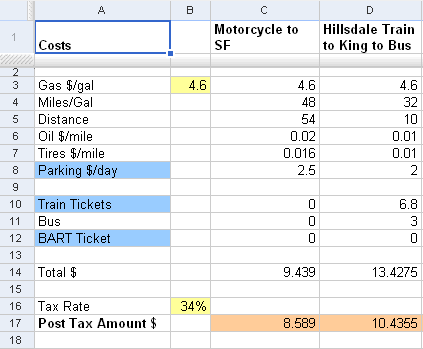
Here is a shot of the spreadsheet table. The final cost is a round trip total. the blue shaded items are the ones that can be paid from the pre-tax account. Here is a view only version of the sheet on Google Docs. If you want to know more just let me know via the comments.
CommuteSheet1

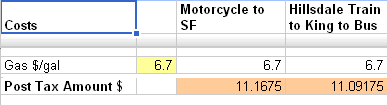
Note: At the time of this post, our gas price is $4.599/gallon. To answer my original question, I just kept increasing the $/gal until the total amount for the train was less than the motorcycle amount. This happened at about $6.70/gal.
CommuteSheet2

After comparing the motorcycle to taking CalTrain to SF, I added a few other commute options which aren't really options until we buy a second car (which we'll do soon before Baby G arrives).

What can you do with a similar sheet? Compare your commuting options, compare the costs of a commute with two different vehicles you are considering buying, calculate your total commute costs over a period of time.

Embrace the spreadsheet! It's your friend!

Changes for the blog

I've made a few changes and updates to the aerialsoul blog. Minor items but things I've been wanting to do for a while.

1. I've burned the RSS feed with FeedBurner which allows me some basic stats for tracking those of you that are reading the blog using a blog reader. Is there anyone actually reading this? Huh? If so, drop me a comment.

2. Added an option to receive the new blog posts via email -- see the bottom right side of the main blog page to sign up for email delivery! Now those that don't use RSS or Blog readers can still stay updated with very little effort.

3. Added the Disqus commenting tool to the blog. This replaces the default commenting provided by Blogger. One of the nice features it that is allows threaded discussions (which Multiply has done for a long time). You will only see this new comment feature on the new posts -- this will be the first one.

4. Added a few new widgets to the right sidebar on the main blog pages. Added a Blog list that shows the recent posts from 4 of my fav blogs and a slide show of my recent Flickr pics.

Tuesday, June 17, 2008

Gas Prices and Commuting

I've been watching the gas prices go up week after week and lately it's day after day. Ava is sick of hearing me gasp at the gas prices each time we pass the corner gas station. It's really just become a morbid fascination.

This pic pretty much sums up my thoughts.

GasHumor Photo from T-Shirt Humor

I'm shocked at how fast the prices are rising, but I'm also optimistic that we will finally see some lasting changes in behavior. Short term spikes in prices don't really change the way people behave or what decisions they make. They aren't likely to run out and sell the SUV and buy a hybrid just because fuel goes up a bit. I'm happy to hear that we are actually seeing some movements in the cars people are purchasing -- and not just in California.

So what have I been doing?

For the last few months, I've been using MyMileMarker to log our fuel purchases. I use the mobile version of the service to log each fill up on the motorcycle and the Civic. I've also lately used their Twitter interface which is super easy to send a Twitter msg from my phone giving the vehicle name, odometer reading, gallons, price/gallon. It helps to monitor the mileage on a regular basis. ServiceBeacon also added a feature to track fuel purchases.

I also wanted to know at which price point was it cheaper for me to take CalTrain on a regular basis instead of riding the motorcycle to work. So of course, I whipped up a spreadsheet (those that know me well, know that Excel is a very good friend of mine).

I know from an eco standpoint, I should be riding the train more often. But the eco decisions are tempered with the reality that I only have 24 hours in a day and the train adds 20-30 minutes each way to my commute.

I'll make another post soon with the details of my spreadsheet work, but I found out that when gas reaches $7.50/gallon, it's cheaper to take the train to work instead of the motorcycle. The bike gets 48 mpg and parking is $2.50/day -- and it saves me an hour a day.

BUT I may start riding the train more often once G arrives. I haven't found a car seat for the motorcycle, so a car will be needed when I start incorporating day care drop offs and pick ups to the daily ritual.

Monday, June 16, 2008

My Network Board profiled on Lifehacker

lh_logo The network board I built a while back to unclutter my desk was profiled last week on Lifehacker. Here is the LH post - Three Reader Gadget Pegboard Mounts.

This is pretty much a full circle blog project - I got the idea from a LH post, came up with a solution that worked for my situation, posted it to my blog, recently posted pics to a LH Flickr group, the solution is posted back to LH, and now I'm posting about the LH post. Great!

I've been thinking about trying to make this project into a product - it's a simple idea/solution, but it still takes time to execute it. But who doesn't want to declutter their desk? Would you consider purchasing this 'type of product' to organize the devices on your desk?

Wednesday, June 11, 2008

Test Post using Win Live Writer

I've been a bit frustrated by the Blogger tool for post creation and came across a post on Lifehacker about Windows Live Writer. I decided to install it and give it a whirl. So this is just a quick post to see how well it can actually push a post to my blog.

If I can find a tool where I don't dread the details of posting more than actually writing, maybe I'll post a bit more often.

Now for a pic - here is a pic of a friend's newborn girl that I took this weekend -- beautiful Reese looks so peaceful.